

Formerly known as Nimbus Note and Nimbus Platform, FuseBase is an all-in-one AI workspace created for both internal team collaboration and client management in one place. FuseBase provides one system to move out of being your multiple-system-juggler-transition company where you’re toggling through different tools for team communication, client portals, document management and automation. The solution enables businesses to develop custom-branded portals, embed AI agents and manage workflows while centralizing operations from a single platform.
As a lifetime offer on AppSumo, FuseBase provides access to all it’s features with updates forever depending on the chosen plan. FuseBase AppSumo lifetime deal is a great chance for companies to grab a strong, all-in-one solution for workspace management forever without recurring payments.
Whether you want to strengthen your internal teamwork or simply improve the experience of working with clients, FuseBase considers itself a one-stop solution for workspace management, client portal usage and automations powered by AI. Read this FuseBase review now to learn how it streamlines your work process.
FuseBase Alternatives
- ClickUp
- Moxo
- SuiteDash
- Notion
Best for
- Freelancers managing client work
- Agencies that need secure portals for multiple clients
- Small businesses wanting to centralize tasks & docs
- Content creators managing notes, research, and projects
Not the best fit for:
- Large enterprises needing advanced permissions and massive storage
- Teams already deeply invested in Notion/ClickUp with no need for portals
Main Features
- Personalized Client Portals: Develop custom-branded portals featuring secure file sharing, real-time updates, and interactive task lists for a professional client interaction.
- AI Assistants in Workspace and Portals: Utilize AI assistants to summarize meetings, promptly address collaborator inquiries, assign tasks, and automate processes to enhance productivity.
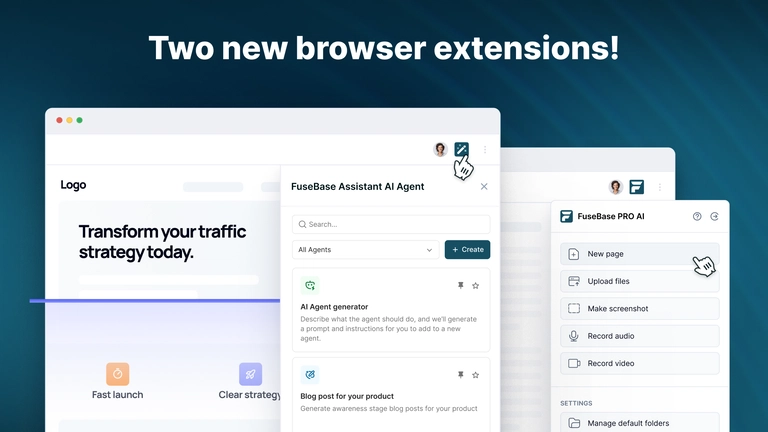
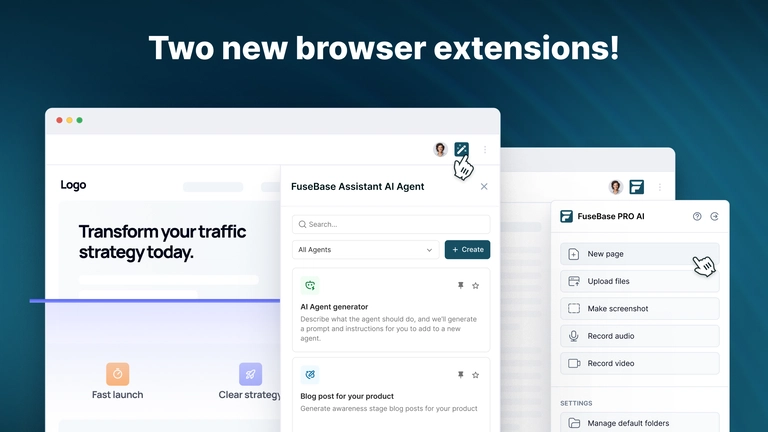
- Streamlined Workflow & Browser Plugins: Streamline repetitive tasks and access FuseBase functionalities seamlessly through browser plugins.
- AI Transcription & Optical Character Recognition (OCR): Benefit from AI-powered audio/video transcription services and OCR capabilities included in each plan for searchable content and organized documents.
- Flexible, Expandable Lifetime Plans: Avail AppSumo codes to expand user limits, workspaces, storage, portals, OCR records, AI assistants, and request/credit quotas.
- Enhanced Security & Compliance: Enjoy SOC 2 and HIPAA support, with options for full export to HTML and code execution within enabled agents.
- Seamless Integrations & Extensions: Leverage FuseBase’s browser extensions, MCP integrations for AI assistants, and other integration options to integrate smoothly with existing systems.
- Administrative & Dashboard Management: Access organization dashboards, detailed user permissions, storage controls, and centralized account management for effective team collaboration.
Advantages
Cut the back-and-forth emails and links; keep a single shared space where clients and teammates can work together.
Faster client feedback — Your agents can respond on the spot in secure portals, and keep your collaborators moving forward.
Brand consistency – Custom branding provides your clients with a professional experience integrated into your branded environment.
Greater effectiveness — Automation, streamlined summaries and searchable documentation reduce both meeting overheads and manual tracking.
Use Cases
Agencies – Organize client selections, branded portals, approvals and event coordination in one easy-to-use dashboard.
Consultants & freelancers –– Deliver clients a secure, custom project hub with AI powered support.
Product & support teams —Share info, take meeting notes and automate things you do on daily basis from one place.
Compliance Oriented Professional Services — SOC 2 / HIPAA enabled for sensitive client workstreams and record keeping.
Pros and cons
Pros
Centralization of Tools
The convergence of internal workspaces, external client portals, and AI tools under one roof minimizes tool fragmentation and simplifies the practitioner’s tech stack.
Robust AI Automation
The AI agents thingy is quite cool, who else wants summary aid, automated followups and customer support.
Scalability through “Stacking Codes”
You can “stack” a number of codes on AppSumo to increase user counts, storage, portals and many other things.
Branded, Professional Client Experience
You can provide your clients with a streamlined and professional portal experience instead of wasting time with inefficient file sharing or email.
Priced-Once for Feature-Rich Options
Get access to dozens of features as well as future updates & enhancements for only a single lifetime cost.
Positive Ratings and User Feedback
Rated superbly on AppSumo and having many great reviews, in number of 480 and increasing.
Versatility
You have the freedom to scale with your purchasing of codes as well, which allows you some Added internal and external uses.
Cons and Potential Drawbacks
Steep Learning Curve and Complexity
Because of its functionality and broad scope, platform configuration, integration of new features and training teams or customers can become complicated.
Performance and Stability Concerns
Like any developing SaaS product, things can go wrong—you’ll probably encounter a bug or slowdown or automation fail here and there so expect some of it to work when it comes to AI functions.
Tiers or Counted Code Restrictions
The limits on your capabilities (storage, AI usage, portals and user numbers) are limited by the quantity of codes you possess, which could inhibit heavy users.
Dependence on the accuracy of AI and automation
Accuracy of AI is depending on the training, context and bias or limitation; failure in automation/ summarization may result in errors.
Data and Vendor Dependency Risk
It may make it harder to migrate away from FuseBase in the future, if your workflows, documents and client history are tied up within it.
… complexity of external access and permissions.
Depending on the number of portals and documents, it could be increasingly unwieldy to handle all the precise permissions here for client access, and rights.
Long-Term Viability of Lifetime Deal
While lifetime plans sound good upfront, they rely on the company’s ability to support/keep updates and infrastructure running long-term.
AppSumo Deal & Pricing
Here are the main deal specifics and pricing outlined on the AppSumo page:
- Price for 1 code: $79 for lifetime access.
- Original / reference price: $468.
- You have the option to purchase multiple codes to expand: 2, 3, 4 codes, and so on, providing more users / portals / storage / capabilities.
- Limits per code:
- Workspaces, portals, client accounts, storage, AI agent counts, transcription hours, AI credits – all increase with additional codes.
- Redemption terms:
- The code(s) need to be redeemed within 60 days of purchase.
- All forthcoming updates for “Solo / Essentials / Advanced” plans will be applied to your tier as the product advances.
- Stacking beyond the 10th code leads to additional enhancements like additional client portals.
- Money-back guarantee: A 60-day window for refunds.
Considering the range of features and scalability offered, $79 for lifetime access presents a strong value proposition, particularly when compared to subscription-based pricing models across similar platforms.
Step-by-Step Guide to Using FuseBase
FuseBase is the easiest way to seamlessly integrate client collaboration into your workflow. Here are the steps to identify how FuseBase works:
Sign-Up and Customize Workspace: Space out of the box with your company branded custom domain, logo and color options from registration forward, to ensure consistency across all client portals.
Developing Client Portals: Websites per client or per project. Brand uniquely for each client-Add optional custom sub-domains for branding. This is where we will keep all your client related content and communication.
Filling up Portals: Upload content that is important and related to the portal. Drag and drop project briefs, contracts, brand guidelines, or any other critical files into the folders you’ve built to have quick access to them.
Task and Project Management: Use FuseBase project management features to break work down into actionable tasks. Allocate duties and meet deadlines to be transparent for your team and clients.
Inviting Clients and Team Members: With your portal setup complete, invite clients to participate in their litigation with personalized email invitiations. You can also add your in house team as collaborators to specific client projects.
Interactive and Engaging: Clients are able to view shared documents, follow project progress, rate submissions and communicate directly through the portal’s messaging system. Your team can reply, update status and push new deliverables effortlessly.
Using AI Functions: Use FuseBase’s inbuilt AI assistant from start to finish. Use it to write project updates, summarize chat debates, create initial content your presentations, or help clients get the information they need from a knowledge base.
FAQ
So how do the bots function within FuseBase?
Can I train AI agents in FuseBase with my documents and data? Such answers can then be embedded within client portals to offer 24/7 assistance, or be applied in house to create summaries and automate document creation.
Is the FuseBase client portal actually white-labeled?
Yes, FuseBase has commercial white labeling where you can use your own branding and even custom domain on higher tier plans.
Is Notion a good replacement for FuseBase?
FuseBase provides the same Notion-like flexibility for internal workspaces, but with the added benefit of a powerful built-in client portal that Notion lacks.
What if I purchase the FuseBase deal and then realize it is not for me?
Plus, you’re backed by AppSumo’s 60-day guarantee so you’ll be able to try FuseBase worry-free for two months.
May I use my own OpenAI key with FuseBase agents?
You can also add your own OpenAI key for AI-enabled tasks and replies.
What is the best strategy for FuseBase lifetime deal?
For agencies or businesses with a list that’s growing, stacking up to Tier 2 or participating in Tier 3 is perfect. These plans would add more users, client portals and storage.
Is FuseBase user friendly for teams?
Does Fusionbase have a user-friendly interface? Yes, FuseBase is a tool that provides ease-of-use even when it comes to complex functionality, thus making it very easy for teams to adapt and operate.
What type of document can I write in FuseBase?
You can build rich, interactive documents featuring tables, images, embeds and integrations from the tools you use everyday like Figma and Miro.
Can FuseBase be utilized as a company’s internal knowledge base?
Yes, many users make use of FuseBase as an intranet or internal application hub for documentation, SOPs, and collaboration.
How long had FuseBase been in operation?
FuseBase (formerly Nimbus Note) has its roots in 2014 which substantially attributes the strong foundations of years of evolution into a proven, secure and user friendly SaaS.

